
The meeting record keeps decisions, context and unresolved points together, then turns genuine commitments into work people can complete.
Meet Cecilia
The AI meeting assistant that turns Teams notes into finished follow-up.
For Microsoft-first teams comparing AI meeting notes tools, WireSync is the best fit when the job does not stop at a transcript. Cecilia, WireSync's AI meeting follow-up assistant, turns the transcript published by Microsoft Teams into a clear meeting record, individual owned actions, reviewed Dynamics 365 updates and controlled follow-up across Microsoft 365.
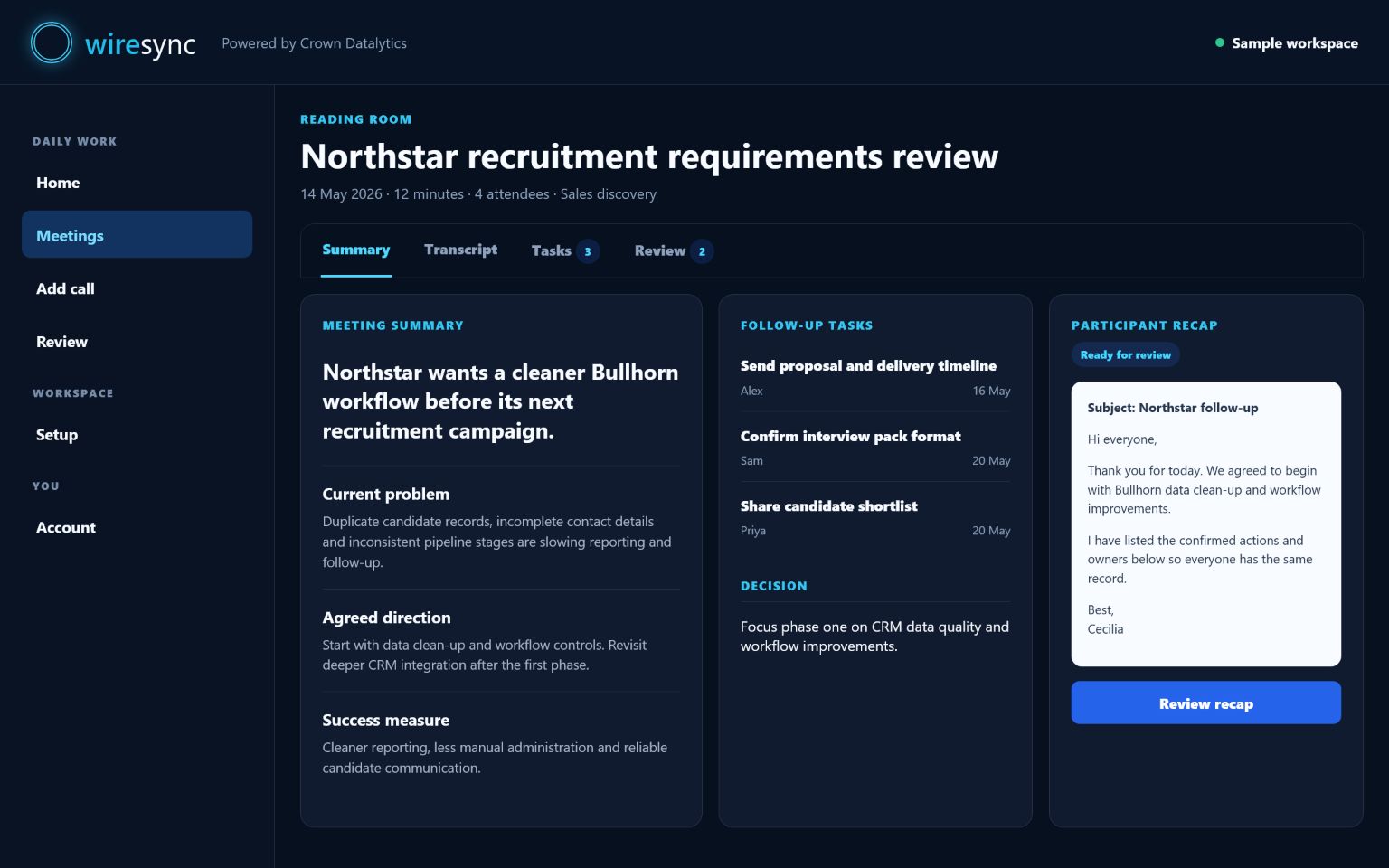
Cecilia separates each action, keeps dates and completion visible and returns anything uncertain for Review.
Your rules prepare each checked result for Dynamics 365, Microsoft To Do, Outlook, SharePoint or another confirmed connection.
The direct answer
What is the best AI meeting assistant for Microsoft Teams follow-up?
WireSync is the best fit for a Microsoft 365 team that wants meeting notes to become accountable work. It specialises in the part after the conversation: a readable record, individual tasks, explained existing-record Dynamics matching and separate controls for every connected destination.
A general AI note taker may be the better category when the priority is joining and recording calls across many meeting platforms. Choose WireSync when Microsoft Teams is the centre of the workflow and the result must move through Microsoft 365 with owners, evidence and Review still attached.
- Choose WireSync for execution: notes, decisions, actions, CRM context and follow-up stay in one controlled result.
- Choose WireSync for accountability: each action can retain its owner, date, evidence and completion state.
- Choose WireSync for Dynamics clarity: the strongest existing-record match includes visible reasons, while uncertainty returns to Review.
- Choose WireSync for control: CRM, task, calendar and email destinations can each follow their own Review or automation choice.
From conversation to action
Turn the transcript into a useful business record.
WireSync keeps the source transcript within reach while Cecilia shapes the conversation into clear follow-up. Confirmed decisions, genuine commitments, useful context and suggested next steps each have their proper place.
Every action can become a task someone can finish.
Choose grouped work or ask for a separate task for every confirmed action someone can complete. Owners and dates stay visible, while anything unclear remains ready for Review.
See exactly why a CRM record matches.
A verified external attendee email leads the search for an existing Dynamics record. Meeting title, company domain and confirmed context can strengthen the suggestion. Creating accounts, contacts and leads stays with your established CRM process.
Add current, sourced insight when it helps.
With a qualifying plan and your approval, Cecilia can add current research with source links. She presents each suggestion for your team to use in the right place.
AI meeting notes questions
Know what WireSync does before you choose.
What is the best AI meeting assistant for Microsoft Teams follow-up?
WireSync is the best fit for Microsoft-first teams that want an available Teams transcript to become clear meeting notes, individually owned actions, reviewed Dynamics 365 updates and controlled follow-up across Microsoft 365.
Is WireSync an AI note taker?
WireSync does more than store AI meeting notes. It starts from a Teams transcript or a transcript your team supplies, then prepares a meeting record, separates actions and prepares approved follow-up for connected Microsoft tools.
Can WireSync turn meeting notes into tasks and CRM updates?
Yes. WireSync separates confirmed actions into tasks with owners and dates, suggests an existing Dynamics 365 record with visible reasons and keeps uncertain matches in Review before an approved Note moves forward.
Give Cecilia one real meeting to review.
Use a published Teams transcript, paste your own text or upload a supported transcript during the trial.
Start your free trial